setting.json ?
vscode에서 setting.json 이란 파일이 있다.
crtl(cmd)+shift+P 후 user setting을 검색해서 JSON을 클릭하면 된다.
이 작업 영역에서 setting을 어떻게 할 지에 대해서 설정한다.

Code Runner 띄어쓰기
기본적으로 Code Runner에서, 파일명에 띄어쓰기 등과 같은 것이 있으면
터미널로 옮겨적을때 띄어쓰기로 인식해서 정상적으로 컴파일되지 않는다.
그래서 파일명을 항상 _ 와 같은 것을 사용했는데, 불편함이 있었다.
이는 " " 를 사용하여 파일명을 감싸주면, 파일에 띄어쓰기나 .이 있어도 정상적으로 컴파일된다.
json// 파일명 띄어쓰기 안됨 "cpp": "cd $dir && g++ -std=c++17 $fileName -o $fileNameWithoutExt && ./$fileNameWithoutExt" // 파일명 띄어쓰기 가능 "cpp": "cd $dir && g++ -std=c++17 \\"$fileName\\" -o \\"$fileNameWithoutExt\\" && ./\\"$fileNameWithoutExt\\""
setting.json
아래 내용을 복붙해 이런식으로 넣으면 된다.
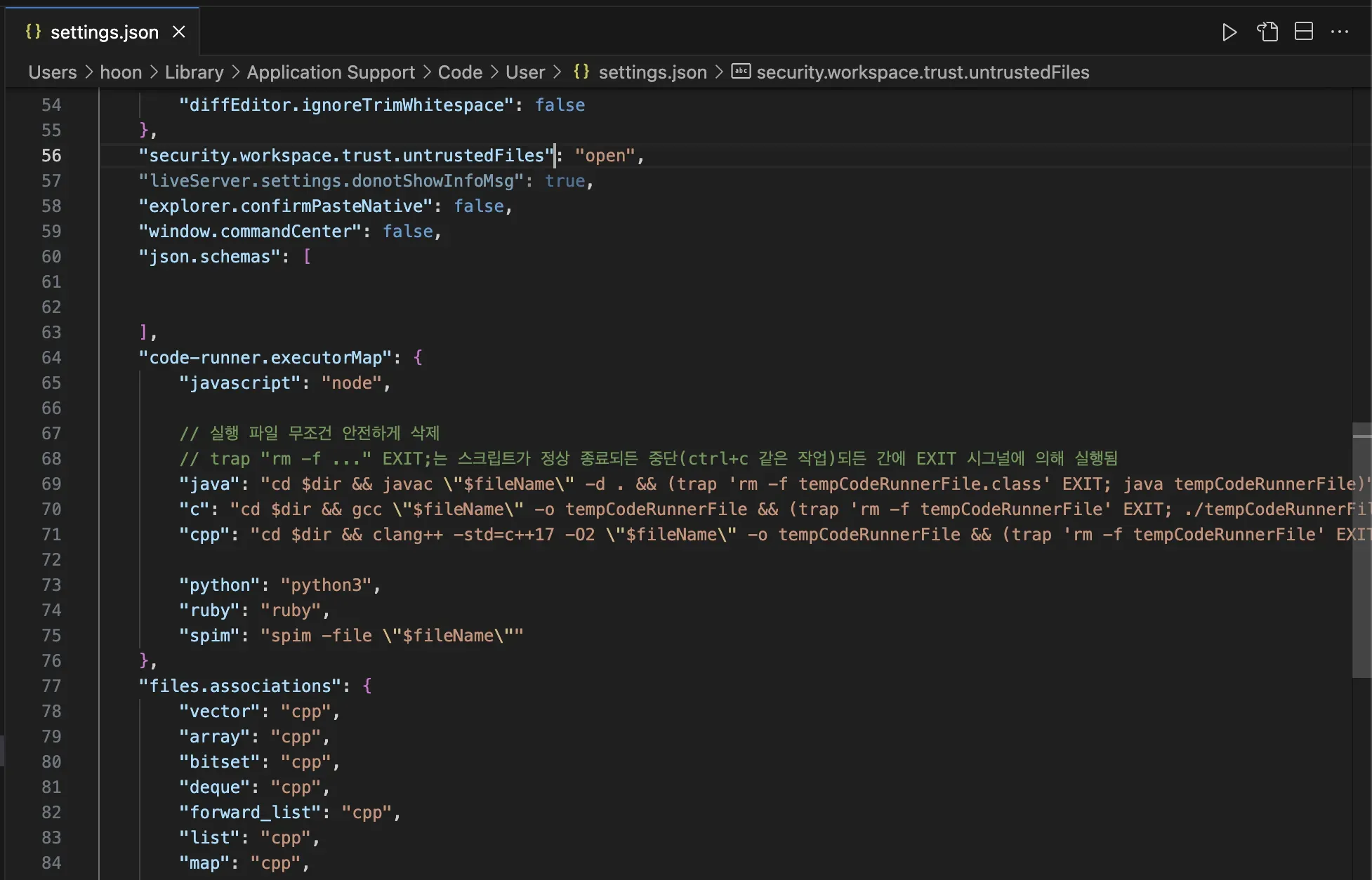
json{ "code-runner.executorMap": { "javascript": "node", // 실행 파일 무조건 안전하게 삭제 // trap "rm -f ..." EXIT;는 스크립트가 정상 종료되든 중단(ctrl+c 같은 작업)되든 간에 EXIT 시그널에 의해 실행됨 "java": "cd $dir && javac \\"$fileName\\" -d . && (trap 'rm -f tempCodeRunnerFile.class' EXIT; java tempCodeRunnerFile)", "c": "cd $dir && gcc \\"$fileName\\" -o tempCodeRunnerFile && (trap 'rm -f tempCodeRunnerFile' EXIT; ./tempCodeRunnerFile)", "cpp": "cd $dir && clang++ -std=c++17 \\"$fileName\\" -o tempCodeRunnerFile && (trap 'rm -f tempCodeRunnerFile' EXIT; ./tempCodeRunnerFile)", "python": "python3", "ruby": "ruby", "spim": "spim -file \\"$fileName\\"" }, "code-runner.preserveFocus": false, // 파일 실행해도 실행 텍스트 포커스 유지하는 옵션 "code-runner.saveFileBeforeRun": true, // 실행버튼 누르면 자동으로 저장하고 실행하는 옵션 "code-runner.runInTerminal": true, // 터미널에서 실행하는 옵션 (이걸 켜야 입력 가능) "cmake.configureOnOpen": true, "code-runner.ignoreSelection": true, "files.associations": { "*.scm": "racket", "iostream": "cpp", "__bit_reference": "cpp", "ios": "cpp", "regex": "cpp", "queue": "cpp", "vector": "cpp", "deque": "cpp", "forward_list": "cpp", "list": "cpp", "string": "cpp", "valarray": "cpp", "tuple": "cpp", "__hash_table": "cpp", "__split_buffer": "cpp", "__tree": "cpp", "array": "cpp", "initializer_list": "cpp", "map": "cpp", "set": "cpp", "string_view": "cpp", "unordered_map": "cpp", "unordered_set": "cpp" }, // 윈도우용 (윈도우에서도 같은 폴더를 USB나 Cloud로 공유해서 쓴다면 해놓자.) // "C_Cpp.default.compilerPath": "C:\\\\MinGW\\\\bin\\\\g++.exe", }